Saturday, 13 September 2014

Europe for beginners: what you need to know

There a reason why Rome's Colosseum and other famous European sites are so popular - they're amazing.

There a reason why Rome's Colosseum and other famous European sites are so popular - they're amazing. Photo: AP

Step one: slow down. Take your time.

It's tempting, when you plan that big first trip to Europe, to try to do everything, to fit every single highlight into a whirlwind tour around perhaps the planet's most diverse continent. You want to eat pasta in Rome, and stand on top of the Eiffel Tower, and smoke a joint in Amsterdam, and party in Dubrovnik, and, and...

You can't do it all. Unless you've got years up your sleeve, you're going to have to do some culling. That's one of the keys to enjoying your first stint.

I got an email a few weeks ago from a guy who's about to set off on his first overseas adventure. His question – "Got any tips for a first-time visitor to Europe?" – sounded like a perfect topic. So here we go.

First, the culling. Europe is an incredibly diverse continent full of bucket-list, postcard locations, and you can't do them all. If you even attempt to do them all you'll spend more time on buses, trains and planes that you will actually seeing things.

So here's a tip: choose a top five, your must-dos for that first OS adventure. Maybe it's drinking in the Hofbrauhaus in Munich, or eating tapas in Barcelona, or visiting the Tate Modern in London. Whatever it is, mark those down and plan your trip around them. The between bits will start to fall into place.

Then you have to figure out how you're getting around. Gnarled old travel dudes like me will tell you to forget about tours and go independent, but that's not necessarily the case. Think about what's right for you. People might sneer at the drunken tour passengers, but the drunken tour passengers are having a ball.

Maybe start off with a short tour, a 10-dayer, to find your feet in Europe and meet some people. If you fancy the idea of an organised tour like a Contiki or a Topdeck, go for it. If you'd rather a bit more freedom, think about something like Busabout – your transfers and accommodation are organised, but you have far more spare time to explore.

Prefer to go independent? It's easy enough in Europe. Book hostels ahead using sites like HostelBookers and HostelWorld. Book train tickets online. Book budget flights well in advance. And remember that using intercity buses is often much cheaper than trains or planes.

Don't avoid the clichés. The Colosseum, the Eiffel Tower and Charles Bridge are all extremely popular with tourists for a reason: they're amazing. Don't feel you have to get off the beaten track just for the sake of it. If the big-ticket items appeal to you, then go and see them.

By the same token, don't do everything the guidebook tells you. It might say the Louvre is an absolute must-do on a trip to Paris, but maybe you'd have a better day searching for Blek le Rat pieces on alley walls.

Travel in the shoulder seasons. July, August and September are mental in Europe, when you'll be sharing every single experience with millions and millions of your closest friends. Accommodation will be booked out, or expensive. Trains will be full.

Think about going in autumn or spring. Or better yet, if you don't mind the cold, go in winter. You'll feel like you have the place to yourself.

Another thing to consider when you're timing your trip, however, is festivals. Europe does a mean festival, from Oktoberfest to San Fermin to La Tomatina to Biennale to Glastonbury to Exit to Tomorrowland. Get along to any one of those and your holiday just became a lot more memorable.

Be wary of scams. If an offer sounds too good to be true, it probably is. That hot Eastern European girl isn't necessarily talking to you because you're so charming. Those guys aren't befriending you because you seem like such a cool Aussie. Go with your instincts.

Try to get to at least one of Budapest, Krakow or Lisbon. They're all amazing, and underrated. (Although when planning this, take the "do what you want" paragraphs into account.)

Learn at least a tiny bit of the local language. Even if it's just asking, "Do you speak English?" This very small amount of effort will get you a long way.

Pack light. You don't need three pairs of jeans in a European summer. You don't need a big tub of laundry detergent. You don't need special "travel" clothes with extra zips bought from some rip-off store.

You do, however, need a towel. And at least one set of decent clothes to wear when you decide to go for that fancy dinner and don't want to look like a backpacker for a night.

Lash out on a few amazing experiences that are out of your price range. Budget travel will make your trip last longer but if you plan for one expensive dinner, or a night in a big hotel, or gondola ride in Venice, or high tea in London, or anything similar, you'll never forget it.

And on that note, my last tip is probably the most important: take lots of money. Lots of money. As much as you can possibly save. And then some more. Don't be the people drinking in the hostel lounge at night because they can't afford to go out. You didn't come all this way to not see the sights.

Take a few more months to save before you go. Be stingy at home so you can lash out when you're away.

Thursday, 11 September 2014

Luxurious 10 Tropical Vacation Spots

Bruce Acacio basically is an aspiring photographer that travels all over the world for experiences and great clicks. Bruce Acacio helps to those vacationers who love to visit the amazing places across the globe. In this blog post Bruce Acacio shares 10 tropical vacation spots. One more post about 10 Best Countries To Live, In 2014? by Bruce Acacio,you can view this post here.

1. Bora Bora


It has often been said that Bora Bora is the most beautiful island in the world, which is why it is included on the top 10 tropical vacation spots. It is well known for its over-water bungalows which are found in most resorts. There are bungalows in every price range, comparably cheap, basic accommodations to very luxuriously expensive. There are many water related activities for kids and adults of all ages.

2. Hawaii
 

No top 10 tropical vacation spots list is complete without Hawaii. Often the most difficult thing about traveling to Hawaii might be deciding which island to visit. This is why many people will chose to visit more than just one island of the eight main islands. Islands range from more relaxed and laid back Kauai, to the volcanic island of Hawaii.

3. Maldives


The Republic of Maldives consists of almost 1200 coral island formed around a double chain of twenty-six atolls. Approximately 200 of the islands are inhabited. However, only about 90 islands are primarily used as vacation spots.

4. British Virgin Islands


The Virgin Islands are a group of tropical islands that form the northern part of the Lesser Antilles. The north-eastern islands form the British Virgin Islands (BVI). The BVI are known as one of the world’s greatest sailing destinations, and charter sailboats are a very popular way to visit less accessible islands.

5. Bahamas
 

The Bahamas consists of 29 islands, 661 cays, and over 2,300 islets. It is one of the most popular tropical destinations for North Americans. This is because it is easy to island hop around, and there are so many islands with much to offer. The capital city of Nassau has everything from relaxing and secluded to more active endeavors such as hiking and sports.

6. Barbados


Barbados is one of the prime tropical destinations in the Caribbean and has numerous world-class accommodations. The southern and western coasts of Barbados offer pinkish sandy beaches and are an ideal spot to enjoy the calm sea. However, the island’s east coast is popular with surfers due to its larger waves.

To see Rest of 10 Tropical Vacation Spots visit resource.


Wednesday, 10 September 2014

10 Most Useful Opera Widgets

Opera widgets are free and small web programs that run outside the browser and make the desktop experience more fun. They can also be useful providing easy and quick access to information or services. There are about 1300 widgets of many kinds. Examples include news feeds, different games, pixel rulers, world web cams, search tools and many others.


Installing widgets in Opera is very easy. To do this, use the Widgets panel or menu and select "Add widget". This will open a web page where you can choose and download widgets that Opera will install automatically.

The most of widgets are very funny but only some of them are actually useful in a real life situation.
This is my list of 10 the most useful Opera widgets that work well for me.

Scientific calculator
The Scientific Calculator Opera Widget provides the look and feel of a real calculator. It allows you to perform mathematical calculations with advanced scientific functions.
Scientific calculator


TouchtheSky
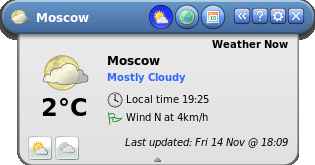
This very useful and nice widget provides you with international weather reports, in detailed, compact and mini modes. With the help of touchtheSky widget you can find out such information as temperature, wind speed, air quality (including humidity, pollen levels, and UV levels), weather forecast for five days and so on.
TouchtheSky Opera Widget


Google Translator

Google Translator allows you to translate text directly in the widget or translate a specified web page.
Of course, this widget will translate only the languages that can be translated by Google's own translation service.
Google Translator Opera Widget


Time and Date
A customizable calendar widget with events and reminders.
Time and Date Opera widget


Torrent PowerSearch
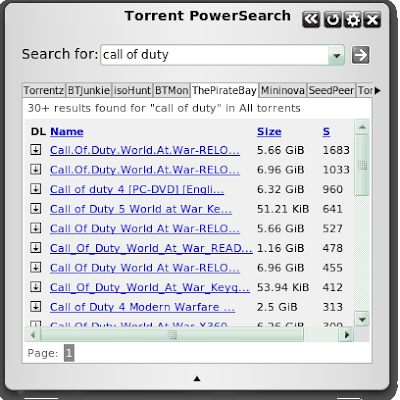
This widget is excellent tool for searching for torrents across multiple sites.
It will display search results in tabs simultaneously for all sites you have selected. Displays all the key information: name, download link, size, seeders, and leechers.
Torrent PowerSearch Opera widget


GoogleToolBar
This nice widget provides you quick and easy access to google services.
GoogleToolBar Opera Widget


Flash Video Downloader
With the help of Flash Video Downloader you can download embedded flash video from video sharing websites like YouTube. Just put the link to the video you want to download to the appropriate field and click "Download!"
You also can use this widget to download flash games from such sites as gamesvine.com, gamespot.com, armorgames.com etc.
Flash Video Downloader widget of Opera

ImageGrep
The ImageGrep Opera widget shows search results from image-search websites such as Google, Flickr and so on.
ImageGrep Opera Widget

iTunes Widget
iTunes widget will show on desktop the latest music provided by iTunes. New Releases, Top Albums, Top Songs, Just Added and Featured Albums and Exclusives available on iTunes. This widget supports all store languages, genres and types.
iTunes Widget Opera

Functions 3D
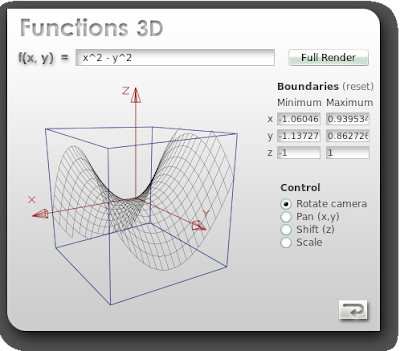
You can use this widget to built surfaces from mathematical expressions. Just enter a mathematical function and have it rendered in a 3D space.
Functions 3D

I like all these Opera widgets and use it everyday.


Monday, 8 September 2014

Top 15 Social Networking Sites You Should Be Using

A List of the Hottest Social Networking Sites and Mobile Apps


The most popular social networking sites sure have changed over the years, and you can expect them to continue to change as times goes on. Old social media trends will die, and new ones will appear.
Before Facebook and Twitter dominated the web, we were a lot more familiar with sites like MySpace and LiveJournal. Although there are some people who still use older social networks like MySpace and LiveJournal, most people can probably admit to moving on to newer, cooler social sites -- especially with the recent shift toward mobile-based social media consumption.
Here is a short roundup of a few of the trendiest social networks people are using both on the web and on mobile right now.
Social Networking Sites - Photo © Dimitri Otis / Getty Images
Photo © Dimitri Otis / Getty Images

1. Facebook

Most of us already know that Facebook is the top social network on the web. It's a thriving beast of a social networking site on the web over a billions users. Despite holding the spot on the entire Internet for years now, it has to lead you to wonder just how long and what it might take for Facebook to eventually be brought down to a lower spot on the popular social site list. Time will only tell. More »
Divorced Or Widowed? Start A New Life & Get Married Again. Register!
Why and how to convert to Islam with Live Help through 1-to-1 chat

2. Twitter

Like Facebook, Twitter has also changed dramatically over the years, becoming a top source for real-time news sharing. For a microblogging site with a 140-character text limit, Twitter sure has made its mark online. Its an ideal platform for mobile users, and Twitter Card integration make it easy to share all sorts of multimedia content in tweets. More »

3. Google+

Making its debut in the early summer of 2011, Google+ became the fastest growing social network the web has ever seen. After failing a couple times already with Google Buzz and Google Wave, the search giant finally succeeded at creating something that people are actually excited about using -- especially alongside all the other popular Google apps and services. More »
Play Online Rummy at Ace2Three Win Rs.3,00,000 Every Week. Hurry!
Connect with over 120,000 suppliers from Hong Kong, China and Taiwan

4. YouTube

Where does everyone go to watch or share video content online? It's obviously YouTube. After Google, YouTube is the second largest search engine. Although owned by Google and now tied right into our Google+ accounts, YouTube can still be recognized as a separate social network all on its own as one that revolves entirely around content like video production, vlogging, movie-making and music sharing. More »

5. LinkedIn

Anyone who needs to make professional connections should be on LinkedIn. Known as the social network for your career, LinkedIn is right up there with Facebook, Twitter and Google+. Individuals can promote themselves and their businesses, outline their education and work experience, make connections with other professionals, interact in group discussions, post job ads or apply for jobs. More »
Dating Chat Rooms & Fun Profiles. Cool Females, Real Dates & Meets.

6. Instagram

Instagram has grown to be one of the most popular social networks for photo sharing that the mobile web has ever seen. It's the ultimate social network for sharing real-time photos and short videos while on the go. The app started by being exclusively limited to the iOS platform, but has since expanded to Androidand, Windows Phone also the web. Instagram was bought for a hefty $1 billion in 2012. More »

7. Pinterest

Pinterest is quickly becoming a major player in social networking, and proves just how important visual content has become on he web. As the fastest standalone site ever to reach 10 million monthly unique visits, Pinterest's beautiful and intuitive pinboard-style platform on the web and on mobile is one of the most incredible resources for collecting the best images and categorizing them on your own boards. More »

8. Tumblr

Tumblr is an extremely popular social blogging platform heavily used by teens and younger users. Like Pinterest, it's popular for sharing visual content. You can customize your blog theme, post all different tpes of content formats, follow other users and be followed back. Reblogging and “liking” is a popular way to interact. If you post great content, you might be surprised to see how many followers you can attract. More »

9. Vine

Vine is mobile video-sharing app owned by Twitter. One of the most convenient things about Vine is that its videos can be directly embedded inline on Twitter when shared through a tweet -- or even embedded on a website. Videos play on autoloop and are limited to a maximum of six seconds, but that doesn't stop it from being such a powerful social network. Many prefer it over Instagram video.More »

10. Snapchat

Snapchat is a social network based on instant messaging, and it's totally mobile-based. It's one of the fastest growing apps out there, building its popularity on the idea of self-destructing "snaps" -- photos or short videos you take to chat with friends before they automatically delete after viewing. It's a massive social app for kids. If you're unfamiliar, check out this step-by-step tutorial on how to use Snapchat.


Content Source - Top 15 Social Networking Sites


Thursday, 4 September 2014

10 Awesome Free Tools To Make Infographics

Information graphics, visual representations of data known as infographics, keep the web going these days. Web users, with their diminishing attention spans, are inexorably drawn to these shiny, brightly coloured messages with small, relevant, clearly-displayed nuggets of information. They’re straight to the point, usually factually interesting and often give you a wake-up call as to what those statistics really mean.

Who can resist a colourful, thoughtful venn diagram anyway? In terms of blogging success, infographics are far more likely to be shared than your average blog post. This means more eyeballs on your important information, more people rallying for your cause, more backlinks and more visits to your blog. In short, a quality infographic done well could be what your blog needs right now.

Designing An Infographic

Some great tips for designing infographics:
  • Keep it simple! Don’t try to do too much in one picture.
  • Decide on a colour scheme.
  • Research some great facts and statistics.
  • Think of it as a visual essay: ensure your arguments hold and are relevant.
  • Remember that it’s all about quickly conveying the meaning behind complex data.
  • Draw conclusions.
  • Reference your facts in the infographic.
  • Include your URL so people can be sure who made it.
World Computer usage   10 Awesome Free Tools To Make Infographics
Ideas for infographic formats include:
  • Timelines;
  • Flow charts;
  • Annotated maps;
  • Graphs;
  • Venn diagrams;
  • Size comparisons;
  • Showing familiar objects or similar size or value.
Here are some great tutorials on infographic creation:
  • How to Create Outstanding Modern Infographics
  • Infographic Designs: Overview, Examples and Best practices
  • Tutorial: Create Cool Infographics
  • 10 of my Favourite Infographics
  • 40 Useful and Creative Infographics
  • Seven and a Half Steps to Successful Infographics
  • The Anatomy of an Infographic
  • 10 Tips for Journalists Designing Infographics

Creating Your Infographic

  • Plan and research.
  • If required, use free software to create simple graphs and visualisations of data.
  • Use vector graphic software to bring these visualisations into the one graphic.
Ultimately, if you have a little design skill, the very best approach is to create all the simple graphs and illustrations yourself using vector graphic software. Your end result will be more visually attractive and you will have more freedom to be creative with it.

Free Online Tools For Creating Infographics

Stat Planet

Stat Planet allows you to create some amazing interactive visualisations, which you can then use as is or create a static image. It can be used within your browser or downloaded for free. Stat Planet gives you access to some great world data and lets you customise that in your visualisations. It also has some great map-based visualisations to try.
StatPlanet   10 Awesome Free Tools To Make Infographics

Hohli

Hohli is an intuitive, simple online chart maker. It’s incredibly easy to pick your chart type, add some data, vary the sizes and colours and see the finished chart. The finished charts are also very well designed and look great!
Hohli Visualisations   10 Awesome Free Tools To Make Infographics

Creately

Creately lets you make easy-to-make diagrams and flow charts (easy to collaborate too). When you start, you can choose from a number of purpose-designed diagram types and quickly add your data to make your own chart. The end result looks very professional.
Creately Diagrams   10 Awesome Free Tools To Make Infographics

New York Times

New York Times’ Visualization Lab lets you use statistics from recent NYTimes articles to create visualisations in various formats. You can also see other people’s visualisations and see how other people choose to display the same data.
NY Times Visualization lab   10 Awesome Free Tools To Make Infographics

Many Eyes

Many Eyes lets you upload your own data or use data already stored on the site. The visualisations themselves are well-designed and very professional-looking. This is definitely the easiest way to use your own data for online visualisations.
Many Eyes Visualisation SMS Frequency   10 Awesome Free Tools To Make Infographics

Google Public Data

Google Public Data lets you easily take public data and transform it into an infographic of your choice. These beautiful, colourful graphics simplify and communicate the data perfectly.
Google Visualisation   10 Awesome Free Tools To Make Infographics

Wordle

Wordle lets you create word visualisations using text you enter. There are plenty of interesting designs to choose from. Enter whole books, short passages or see what other people have used. In this example, we can see the US constitution visualised.
Wordle visualisation   10 Awesome Free Tools To Make Infographics

Free Software For Creating Infographics

Tableau

Tableau is a free Windows-only software for creating visualisations. As you can see, these impressive graphs are colourful and quite unique.
Tableau Visualisation2   10 Awesome Free Tools To Make Infographics

Gapminder

GapMinder is a free Adobe Air (cross-platform by nature) application to ensure you have current data on major world issues and can create visualisations for your purposes. Data is updated yearly and released with new versions of the application. The visuals are also quite impressive!


Inkscape

Inkscape is a free vector graphic software available for many platforms. This is the ideal free option for the creation of your overall infographic. Simple and intuitive, you should have no problems importing your visualisations and combining them with other visuals to create your masterpiece.
inkscape rpg map   10 Awesome Free Tools To Make Infographics

Love Infographics?

If you’re a fan of infographics, these tools will probably become part of your everyday blogging tools. Feel free to let us know of more great tools in the comments!


Content Source